Digital Drop In

Digital support in libraries
Digital skills enable us to use devices including computers, laptops and smartphones to access the internet and lots more. We're here to help you find the support you need to get access to digital skills and equipment across Bolton.
Library one-to-one sessions
Bolton Library and Museum Services offer free one-to-one support for people who need help to get online and use their devices. The support is delivered by a network of Digital Helpers who have undertaken training to be able to support you with a variety of needs. Our one-to-one sessions are 1 hour long sessions with one learner and one volunteer at a time. These sessions are unaccredited, informal, learn at your own pace. There is no limit to how many sessions you can book but we do recommend that you book one at a time.
Our volunteers can help support with:
- Basic Device Navigation
- Online Job Searching
- Email Account Setup
- Attaching Documents to Emails
- Digital Security & Safety
- Accessing the NHS App
- Basic Microsoft Office Apps
- Navigating Social Media
- Online Shopping
- And much more...
We have multiple sessions available at Bolton Central Library throughout the week and many sessions at some of our branch libraries. Please contact DES@bolton.gov.uk or call 01204 332853 for more information and to book a session.
Download our one-to-one leaflet
Tea & t'internet
If you need help with your laptop, tablet or smartphone call in to a Tea and T'internet digital drop in at one of our community libraries. Enjoy a warm drink while you get to grips with your device.
There's a drop in at Central Library each week and the listed libraries once a month. There's no need to book, just call in!
Download the Tea & T'internet leaflet
To find out how to get to your chosen drop in location, click the library name:
|
Location |
Day/Time |
|---|---|
|
Every Thursday 2pm-4pm |
|
|
Third Monday of month 2pm-4pm |
|
|
Second Tuesday of month 2pm-4pm |
|
|
Last Monday of month 2pm-4pm |
|
|
Last Thursday of month 2pm-4pm |
|
|
Last Friday of month 2pm-4pm |
Digital Health Hubs
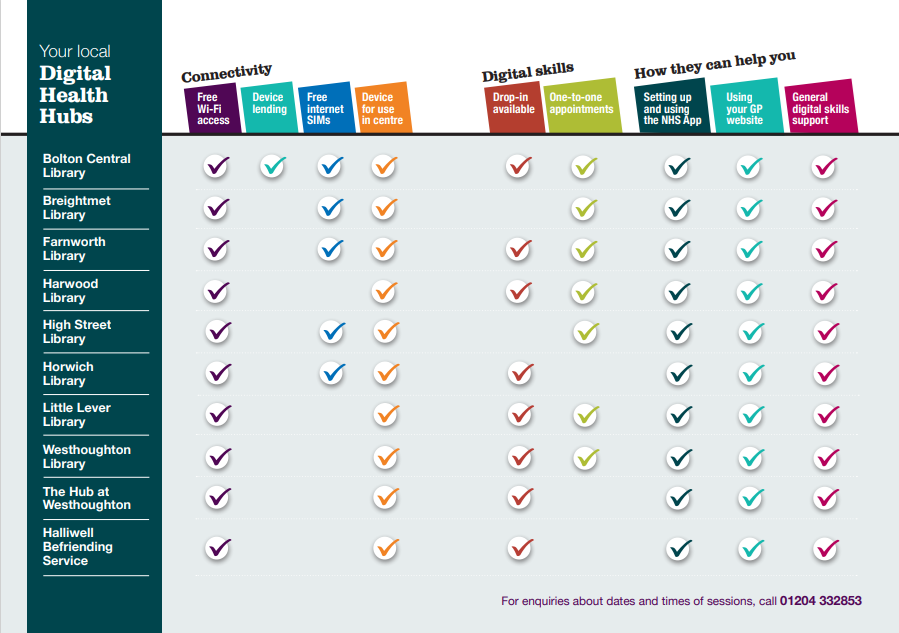
You can now get free, freindly support to download and use the NHS App and access other online health resources at your local Digital Health Hub. Trained staff and volunteers can support you to set up the app, log in securely and understand how to usefeatures such as order repeat prescriptions, book appointments and view your health information. Support is available in person at several libraries and community venues accross Bolton and no previous digital skills are needed.
You can view the Digital Health Hub Guide by downloading it here.
To find out more about the NHS App, visit the website.
Free wifi and public computers
Visit your local library for access to computers and Wi-FI free of charge. You can use a library computer up to one hour free of charge with a small charge for any subsequent time a computer is used. If you are job seeking please let a member of staff know and we will be able to add time to your session free of charge. See library opening hours
If you have your own device and need access to the Internet, all of Bolton's libraries have free Wi-Fi available. Ask a member of staff for help to connect your device.
Free data, calls and texts SIM cards
If you are 18+ years old, from a low-income household, and can answer yes to one or more of the statements below, you are eligible for a free SIM via the National Databank.
Does one or more of the following apply to you?
- I have no access or insufficient access to the internet at home
- AND/OR I have no or insufficient access to the internet when away from the home
- AND/OR I cannot afford your existing monthly contract or top up
Download the National Databank leaflet
To collect a free SIM, please attend one of our Greater Manchester Databank Drop-Ins at one of our participating libraries. See below for all drop-in locations and times. For more information, email DES@bolton.gov.uk or call 01204 332853.
|
Location |
Day/Time |
|---|---|
|
Tuesdays 3pm-5pm |
|
|
Fridays 2pm-4pm |
|
|
Fridays 2pm-4pm |
|
|
Tuesdays 4pm-6pm |
|
|
Mondays 2pm-4pm |
Digital Lending Library
If you are undertaking a course and do not have access to a device at home, you may be able to borrow a device and get data from the Bolton Digital Lending Library for free. We have both Samsung Tablets and Chromebooks available for loan.
Referral from an organisation is needed. Referrals can be obtained from any organisation within Bolton who you are working with. There is a referral form we will need the organisation to complete in order to make an official referral. Organisations can email us at DES@bolton.gov.uk for more information and to request a referral form.
Devices are loaned for three months at a time with the option to extend your loan. Please let us know during the referral process or loan appointment if you would need the device for longer.
We also have sets of Windows Laptops available for organisations available for loan. These project loans can be accessed by organisations looking to facilitate learning within their premises. Find out more by visiting the Partners section of our website.
Bookable, free, one-to-one sessions with a Digital Helper are available once you have received your loan to get to grips with the device. Call 01204 332853 or email DES@bolton.gov.uk to book your session.
Digital help